


First View
4.6316.00 Reviews
App Specs
- Version
- 8.1.0
- Updated On
- License
- Free
- Downloads
- 100,000+
- Developer
- First Student Inc.
- Categories
- Travel & Local
- Platform
- Android
Screenshots

 Analysis by AppCompare
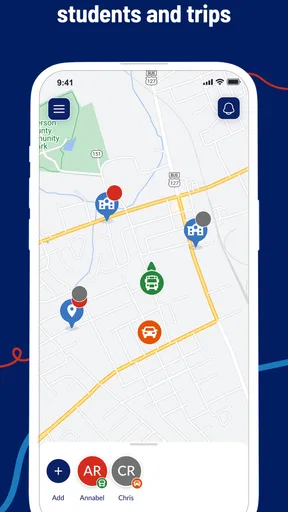
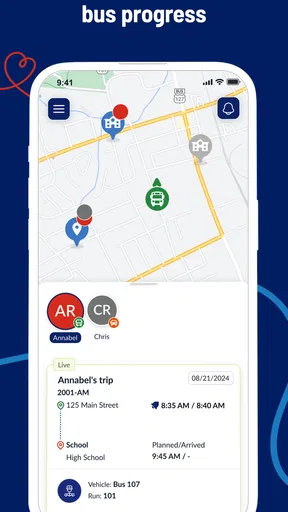
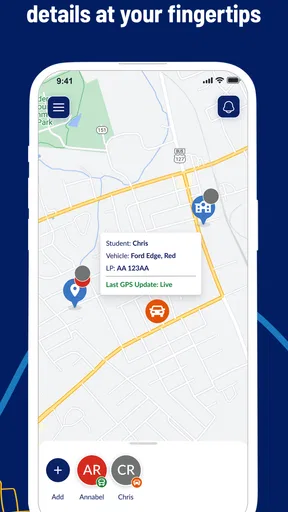
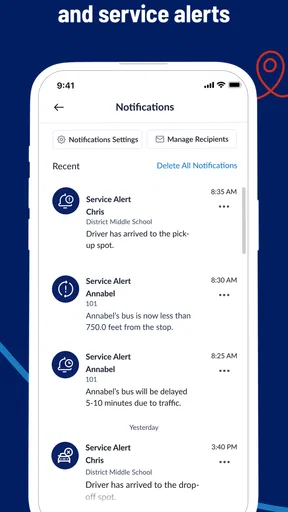
When a child depends on a school bus, the hardest part is often not the ride itself but the waiting: Is the bus close, has it left, and should someone be ready at the stop? First View is designed for that narrow but important problem. I tested it as a family travel app from First Student Inc., and I found its main value in giving a household one shared place to check a student’s journey instead of relying entirely on messages, phone calls, or guesswork.
The app is free, aimed at Everyone, and belongs to the Travel & Local category. Its store summary, “Track Your Student’s Journeys,” describes the purpose accurately, although my experience is that the real benefit is less about watching a moving icon and more about improving the small decisions around school mornings and afternoons. It is available for Android and iOS, with the current release identified as version 8.1.0 and a minimum operating system requirement of 10.
How First View fits into a shared household routine
I’d make the household routine clear before anyone relies on the screen: decide which adult checks the journey and who takes over if that person is busy. That small agreement helps turn First View into a calm handoff tool rather than another source of duplicate checking. It also gives the family a natural starting point for deciding how much independence the student should have.
A practical morning example
Imagine a parent working from home while another adult handles breakfast. The student leaves for the stop, but the parent still needs to know whether the bus is approaching before stepping away from a meeting. With First View available on the phone, the parent can check the journey at the relevant moment rather than repeatedly walking to the window or asking the child to send updates.
That sounds modest, but this is exactly where the app makes sense. It is not trying to replace a school timetable, a family calendar, or direct communication. It adds a live travel reference to a routine that already exists. I found it most useful when several people share responsibility: one adult may get the student ready, another may meet the bus, and the student may need a simple reminder about when to leave the house.
A second useful situation is the afternoon pickup. If a caregiver is preparing to leave work, checking the journey can help them decide when to head toward the stop. The app does not remove the need to allow extra time, because traffic, weather, loading delays, and a phone with a weak connection can all affect real-world timing. Still, it can reduce the uncertainty between “the bus should be coming soon” and “it is sensible to go outside now.”
My strongest recommendation is to treat First View as a coordination tool, not as a guarantee of exact arrival timing. That distinction matters. A tracking screen can support a decision, but it should not encourage a child to wait alone in an unsafe place, cross a road quickly, or assume that a vehicle will arrive at precisely the displayed moment.
Worth Reading Before You Choose

Flipboard Shows What News Apps Must Do Beyond the Feed

Switching to Android Auto Means Rethinking Your Driving Routine

Google Calendar Makes a Crowded Week Easier to Manage

Ludo King Makes the Most of the Minutes Between Plans

Baby Panda World Brings Quick Play to Modern Phones, but Its Game Library Feels Busy

ESPN’s Live Game View Makes Following Close Games Easier
Why it is different from ordinary alternatives
The usual alternatives are a printed schedule, a school message, a phone call, or a family group chat. Each has a weakness. A printed schedule tells you the planned route but not what is happening today. A message may arrive after the useful moment. A call requires someone to be available. A group chat can become cluttered, especially when several family members ask the same question.
First View occupies the space between a static timetable and a conversation. It is more immediate than a paper schedule and less dependent on one person remembering to send an update. That makes it particularly convenient for households where the adult meeting the student is not the same person who saw them leave.
It is not a complete replacement for those alternatives, though. I would still keep the regular stop time available, maintain a backup contact method, and make sure the student knows the normal safety routine. The app is strongest when it supplements household planning rather than becoming the only source of information.
Setting it up without blurring account boundaries
The first setup decision should be about responsibility. The adult who normally coordinates transportation should take the lead, while other household members should understand what they are expected to do with the information. Installing the app on every phone without agreeing on a routine can create the opposite of clarity: several people checking independently, interpreting the display differently, and assuming someone else is handling pickup.
I would begin by identifying the student’s assigned journey and confirming that the displayed route matches the family’s understanding of the school transportation arrangement. A careful first check is worthwhile because a tracking app is only useful when the correct student or route is being viewed. If something looks wrong, it is better to resolve that before an urgent morning rather than discovering the problem at the stop.
Shared-device households need an extra layer of care. A phone used by several people should not be left open in a way that lets a child accidentally change the active view or lets a visitor see travel information. The practical solution is simple: decide who owns the setup, keep the device secured, and avoid treating a shared screen as a substitute for personal responsibility.
Families should also separate the app’s role from school administration. First View can help with journey awareness, but questions about enrollment, route assignments, absences, or transportation changes belong with the relevant school or transportation contact. Sending those questions through an unrelated family chat or assuming the tracking display will explain every change can waste time.
Using one account across several adults
Households often need access from more than one phone, but access should be organized rather than casual. I recommend choosing a primary adult and a backup adult, then agreeing on who checks the morning journey and who checks the afternoon pickup. That small division prevents the common problem where two people assume the other person is watching the route.
There is also a useful boundary between adults and children. A student may benefit from knowing that the bus can be checked, but the app should not become a reason to stare at a phone while walking or to leave a safe waiting place early. For younger children, an adult can use the information to manage the routine while keeping the child’s own task simple: get ready, reach the agreed stop, and follow the family’s safety plan.
For older students, the app can support more independence. A teenager might check the afternoon journey and tell the adult when they are preparing to leave school. Even then, I would frame it as shared coordination rather than surveillance. The healthiest arrangement is one where the student knows what information is being used and why, and where a delayed response is handled through an agreed backup plan instead of repeated demands for live updates.
One non-obvious advantage of this approach is that it reduces duplicated checking. If one adult confirms that the journey is being monitored, another can focus on preparing food, finishing work, or meeting a different child. The app becomes part of a household handoff system, not another notification competing for attention.
What the journey view can and cannot solve
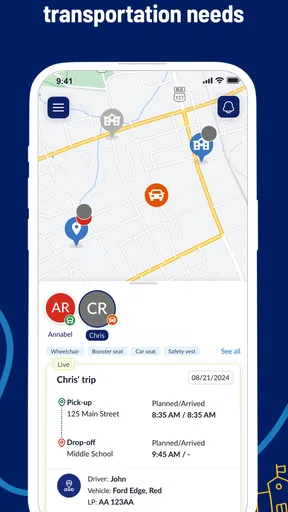
The central experience is straightforward: check the student’s journey and use that information to make a practical decision. The value depends on the timing of the check. Looking once before leaving home may be useful, while repeatedly refreshing without a plan can increase anxiety without improving the outcome.
I found a better workflow was to check at two meaningful points: first when deciding whether to leave for the stop, and again if the expected timing changes enough to affect the pickup plan. This avoids turning the app into a constant monitoring habit. It also makes it easier to notice a genuine change rather than reacting to every small movement on the screen.
The app cannot remove the need for a buffer. A route display is not the same as a promise, and a student may still need to wait. Families should choose a visible, agreed meeting location and make sure the child knows what to do if the bus is late, the phone battery is low, or the adult is delayed. Those instructions are more important than any individual status shown in the app.
This is also where First View may not be the right choice. If your child walks, cycles, uses public transit independently, or attends a school without a compatible transportation arrangement, a general transit app or school communication channel may be more relevant. Likewise, if you only need the planned pickup time and never face uncertainty around the journey, the extra tracking step may not add much value.
Age, trust, and responsible use
The Everyone content rating makes the app broadly suitable from a store-rating perspective, but suitability in a household still depends on how it is introduced. Younger children may not understand that location information is contextual and imperfect. They may interpret a route display as permission to move toward the bus immediately or as proof that an adult is already waiting.
That is why I would explain the app in plain language: it helps adults organize the journey, but it does not replace looking both ways, staying in the agreed place, or asking for help when something feels wrong. A child does not need to manage every detail of the app to benefit from it.
For older children, trust becomes the bigger issue. Tracking can feel supportive in one family and intrusive in another. Before using it as part of a daily routine, adults should explain what they are checking and avoid turning normal delays into accusations. A bus journey can change for reasons that have nothing to do with a student’s behavior.
My practical rule is to use the information for logistics, not judgment. “I see the journey is later, so I will wait inside a little longer” is a constructive use. “The display changed, so you must have done something wrong” is not. That boundary makes the app more useful and keeps the conversation focused on safety and coordination.
Performance expectations and everyday friction
First View is not a complicated productivity platform, and that is part of its appeal. There is no need to build a large family system around it. The friction comes from the surrounding circumstances: someone may forget to check, a device may be shared, the student’s routine may change, or the displayed journey may not answer the exact question a parent has.
New users should give themselves time to learn where the relevant journey appears and what information is most useful for their own stop. The first few uses are better treated as practice than as high-pressure tests. Once the household understands the normal pattern, unusual changes are easier to recognize.
Another trade-off is attention. A tracking app can make a parent feel more informed, but it can also encourage unnecessary checking. I prefer using it at agreed decision points and keeping a backup routine for situations where the app is unavailable or unclear. That approach preserves the convenience without making the family dependent on a single screen.
The app’s popularity suggests that this focused use case resonates with many families: it carries an average rating of 4.6 from around 4,800 ratings, and it has passed 100,000 installs. Those figures do not change the need for sensible expectations, but they do indicate that First View has found an audience among people looking for school-journey visibility rather than a broad travel planner.
Who will get the most from First View
I would recommend it most strongly to parents and caregivers who regularly coordinate school-bus pickup across different work schedules, homes, or devices. It is also a good fit when a student’s arrival affects a tightly timed routine, such as an adult switching from remote work to pickup duty or managing several children at different stops.
It can be especially helpful during the transition to a new school year or a new transportation routine. Instead of asking a child to provide every update, an adult can learn the pattern and use the app to support a calmer handoff. The best results come when the family combines it with clear instructions rather than expecting the app to teach the routine by itself.
I would be more cautious about recommending it to someone who wants a full family location platform, detailed trip planning, or broad public-transit coverage. First View is specialized. Its strength is the school journey; its limitation is that it should not be mistaken for an all-purpose travel application.
My household verdict
After using First View, I see it as a focused convenience with a clear place in a family’s transportation routine. It helps answer the practical question of whether a caregiver should prepare to meet a student, while leaving the actual safety decisions and communication responsibilities with the household.
The best way to use it is to assign a primary adult, establish a backup plan, explain the boundaries to the student, and check the journey at sensible moments instead of refreshing constantly. Keep the regular stop details and emergency contacts available, because no tracking view can account for every delay or change.
First View is free, developed by First Student Inc., and its current version is 8.1.0. For a family whose student uses a supported school-bus service, it is worth trying because the benefit appears in small daily decisions rather than flashy extras. I would recommend it to households that need better coordination, while advising anyone seeking general navigation or independent transit planning to choose a broader travel tool instead.
My final view is positive but measured: First View works best when it adds confidence without replacing judgment. Used that way, it can make shared pickup responsibilities easier, keep adults better aligned, and give students room to grow in independence without turning every journey into a source of tension.
Pros
- Quickly previews app content without opening every item.
- Clean interface makes browsing simple for new users.
- Useful for checking layouts before sharing or publishing.
- Supports faster decision-making when reviewing multiple items.
- Lightweight experience with minimal setup required.
Cons
- Some previews may not fully match the final app experience.
- Advanced viewing options may be limited for power users.
- Performance can vary on older phones or slower connections.
- Not every type of content may be supported equally well.
- Privacy details should be checked before granting access permissions.
FAQs for First View
What is First View, and what can I use it for?
First View is an application designed to give users quick access to selected content and features from a single mobile interface. Depending on the version and platform, it may help you browse updates, discover relevant information, or manage content more conveniently. Before downloading, check the app’s current description, supported regions, and screenshots because available functions can vary between Android and iOS.
Is First View free to download and use?
First View may be available as a free download, but some features could require in-app purchases, a subscription, or access to a specific service. I recommend reviewing the store listing carefully before installing it, especially the pricing section and subscription terms. Also check whether the free version includes advertising, limits certain tools, or requires an account to unlock the complete experience.
What permissions and personal information does First View require?
The permissions requested by First View depend on how you use the application and which features are enabled. It may request access to notifications, storage, network connectivity, or other device functions. Before accepting, review the permission prompts and the developer’s privacy policy. Avoid granting access that seems unrelated to the app’s main purpose, and verify how account or usage data is collected and shared.
Does First View work on all Android and iOS devices?
First View is not necessarily compatible with every phone or tablet. Compatibility can depend on the operating system version, device architecture, screen size, available storage, and regional availability. Before downloading, open the official Google Play or App Store page and confirm the minimum requirements. Keeping your device and the app updated can also improve stability, although older devices may still experience slower performance.
Is First View safe and reliable to install?
The safest way to install First View is through the official Google Play Store or Apple App Store rather than an unofficial APK or third-party download site. Check the developer name, user reviews, update history, privacy information, and requested permissions before proceeding. No application is completely risk-free, so keep your operating system updated and contact official support if you notice crashes, unusual activity, or unexpected charges.


